> ## Documentation Index
> Fetch the complete documentation index at: https://docs.4096bytes.com/llms.txt
> Use this file to discover all available pages before exploring further.
# Get an API Key
> Create an API Key for 4096bytes client access
An API Key is the credential that lets a client call 4096bytes. You need one before connecting Codex, Claude Code, Cursor, Cherry Studio, or another client manager.
Create separate API Keys for different clients or devices. For example, use one key for Codex, one for Cursor, and one for Cherry Studio. This makes usage easier to trace and lets you disable only the affected key if a client leaks it.
An API Key is an account credential. If it is exposed, others may consume your balance. Delete leaked keys immediately and create a new one.
## Open the API keys page
Visit [https://dash.4096bytes.com/login](https://dash.4096bytes.com/login) and sign in to your 4096bytes account.
In the left menu, open **API Keys**.
The page lists keys created under the current account. You can refresh the list or create a new key.
 If old keys already exist, do not reuse the same key everywhere. Prefer names such as `claude-code-mac`, `codex-work`, or `cursor-desktop`.
## Create a key
Click **Create key**. The dashboard opens a dialog. At minimum, fill in **Name** and choose a **Group**. Keep other switches off unless you know you need the restriction.
If old keys already exist, do not reuse the same key everywhere. Prefer names such as `claude-code-mac`, `codex-work`, or `cursor-desktop`.
## Create a key
Click **Create key**. The dashboard opens a dialog. At minimum, fill in **Name** and choose a **Group**. Keep other switches off unless you know you need the restriction.
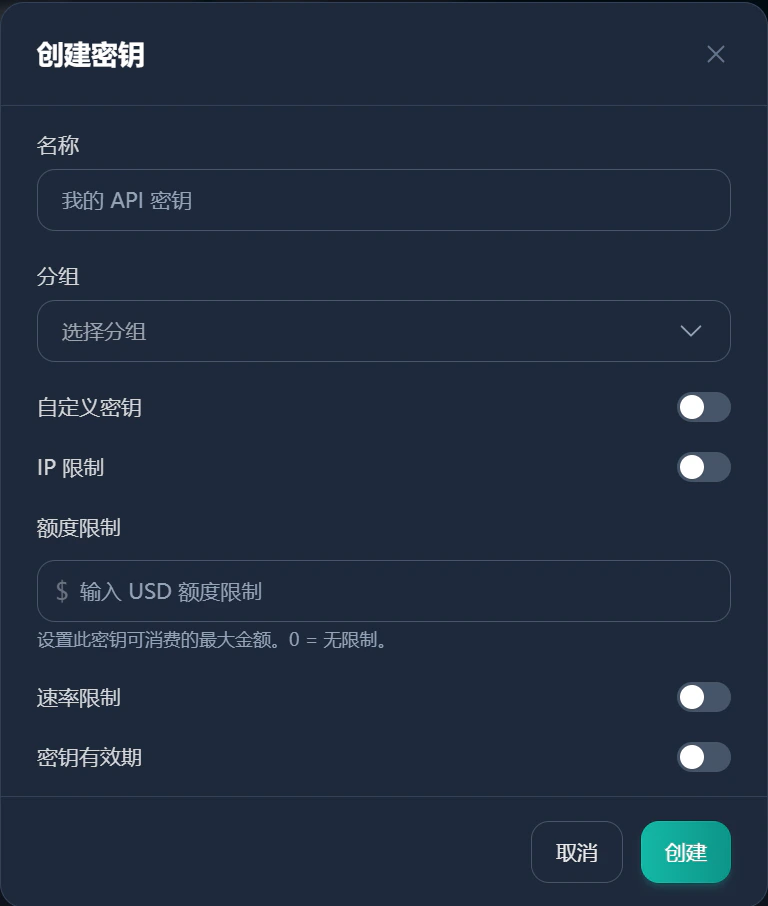 Use a clear name such as `macbook-codex`, `cursor-work`, or `cherry-studio-home`.
Select the model route, plan, or group this key should use. Rates, available models, and quota rules may differ by group. Use what the dashboard shows.
Keep **Custom key** disabled unless you have a specific reason to fix the key string. Auto-generated keys are safer.
Use **IP restriction** only for fixed servers or fixed outbound IPs. It is usually not suitable for laptops or mobile networks.
**Quota limit** controls the maximum USD amount this key can consume. `0` means unlimited. Use a small limit for temporary projects, team members, or rarely used devices.
Enable **Rate limit** only when you need to reduce concurrency or prevent abnormal client usage.
Use **Key validity period** for temporary test keys. Long-term local tools can stay valid longer.
Click **Create**. Copy the API Key immediately and store it somewhere safe.
API Keys are usually shown in full only once. If you forget to save a key, delete it and create a new one.
## Naming examples
| Scenario | Example name |
| ------------- | -------------------- |
| Codex CLI | `codex-macbook` |
| Claude Code | `claude-code-work` |
| Cursor | `cursor-desktop` |
| Cherry Studio | `cherry-studio-home` |
## Store and use the key
Store the key in a password manager, system keychain, or local-only environment variable. Do not put it in public repositories, screenshots, chat logs, or shared documents.
For Claude Code, check whether the API key list has a **Use key** action. The dashboard may show environment variables or config snippets for that key.
For tools that support import, check whether the dashboard provides a one-click import action. Names and available actions depend on the current dashboard.
## Test whether the key works
After creating a key, prefer the target client's built-in test action. You can also test the OpenAI compatible models endpoint.
### macOS or Linux
```bash theme={null}
curl "https://api.4096bytes.com/v1/models" \
-H "Authorization: Bearer YOUR_4096BYTES_API_KEY"
```
### Windows PowerShell
```powershell theme={null}
Invoke-RestMethod `
-Uri "https://api.4096bytes.com/v1/models" `
-Headers @{ Authorization = "Bearer YOUR_4096BYTES_API_KEY" }
```
Replace `YOUR_4096BYTES_API_KEY` with the API Key you just created.
If the response contains a model list, the API Key and Base URL are basically working.
If the test fails, check these items first.
| Item | What to check |
| ---------------- | --------------------------------------------------------------------------- |
| Complete key | Do not miss characters or copy extra spaces/newlines. |
| Available group | The key group must be enabled and contain the model you call. |
| Balance or quota | Account balance, subscription quota, and key quota can all affect requests. |
| Correct Base URL | Copy the Base URL shown in the dashboard. Do not guess the path. |
## Maintenance
Regularly remove unused keys. Disable or delete keys that are old, unclear, unused, or suspected to be leaked.
After deleting a key, any client using it will fail immediately. Create a new key and update the client configuration.
## Next step
Choose a client: [CC Switch](/en/clients/cc-switch), [Codex](/en/clients/codex), [Claude Code](/en/clients/claude-code), [Cursor](/en/clients/cursor), or [Cherry Studio](/en/clients/cherry-studio).
Use a clear name such as `macbook-codex`, `cursor-work`, or `cherry-studio-home`.
Select the model route, plan, or group this key should use. Rates, available models, and quota rules may differ by group. Use what the dashboard shows.
Keep **Custom key** disabled unless you have a specific reason to fix the key string. Auto-generated keys are safer.
Use **IP restriction** only for fixed servers or fixed outbound IPs. It is usually not suitable for laptops or mobile networks.
**Quota limit** controls the maximum USD amount this key can consume. `0` means unlimited. Use a small limit for temporary projects, team members, or rarely used devices.
Enable **Rate limit** only when you need to reduce concurrency or prevent abnormal client usage.
Use **Key validity period** for temporary test keys. Long-term local tools can stay valid longer.
Click **Create**. Copy the API Key immediately and store it somewhere safe.
API Keys are usually shown in full only once. If you forget to save a key, delete it and create a new one.
## Naming examples
| Scenario | Example name |
| ------------- | -------------------- |
| Codex CLI | `codex-macbook` |
| Claude Code | `claude-code-work` |
| Cursor | `cursor-desktop` |
| Cherry Studio | `cherry-studio-home` |
## Store and use the key
Store the key in a password manager, system keychain, or local-only environment variable. Do not put it in public repositories, screenshots, chat logs, or shared documents.
For Claude Code, check whether the API key list has a **Use key** action. The dashboard may show environment variables or config snippets for that key.
For tools that support import, check whether the dashboard provides a one-click import action. Names and available actions depend on the current dashboard.
## Test whether the key works
After creating a key, prefer the target client's built-in test action. You can also test the OpenAI compatible models endpoint.
### macOS or Linux
```bash theme={null}
curl "https://api.4096bytes.com/v1/models" \
-H "Authorization: Bearer YOUR_4096BYTES_API_KEY"
```
### Windows PowerShell
```powershell theme={null}
Invoke-RestMethod `
-Uri "https://api.4096bytes.com/v1/models" `
-Headers @{ Authorization = "Bearer YOUR_4096BYTES_API_KEY" }
```
Replace `YOUR_4096BYTES_API_KEY` with the API Key you just created.
If the response contains a model list, the API Key and Base URL are basically working.
If the test fails, check these items first.
| Item | What to check |
| ---------------- | --------------------------------------------------------------------------- |
| Complete key | Do not miss characters or copy extra spaces/newlines. |
| Available group | The key group must be enabled and contain the model you call. |
| Balance or quota | Account balance, subscription quota, and key quota can all affect requests. |
| Correct Base URL | Copy the Base URL shown in the dashboard. Do not guess the path. |
## Maintenance
Regularly remove unused keys. Disable or delete keys that are old, unclear, unused, or suspected to be leaked.
After deleting a key, any client using it will fail immediately. Create a new key and update the client configuration.
## Next step
Choose a client: [CC Switch](/en/clients/cc-switch), [Codex](/en/clients/codex), [Claude Code](/en/clients/claude-code), [Cursor](/en/clients/cursor), or [Cherry Studio](/en/clients/cherry-studio).