Claude Code reads Anthropic-related configuration. When connecting to 4096bytes, do not paste an OpenAI compatible URL into unrelated fields and do not manually append /v1/messages. Use the Claude Code settings shown in the dashboard.
Prefer managing the Claude Code Provider with CC Switch. It lets you switch between 4096bytes, official Claude, and other Providers without repeatedly editing environment variables.

Prerequisites

  • You have completed Create an account.
  • You have completed Get an API Key.
  • Claude Code is installed and claude can start.
  • You have copied the Claude Code configuration from the dashboard.
If you use both an official Claude subscription and a 4096bytes API Key, keep them in separate terminal profiles or CC Switch profiles to avoid environment variable conflicts.

Install

If Claude Code is not installed, follow the official Claude Code setup documentation. macOS, Linux, or WSL:
curl -fsSL https://claude.ai/install.sh | bash
Windows with WinGet:
winget install Anthropic.ClaudeCode
If you use npm for global CLI tools:
npm install -g @anthropic-ai/claude-code
After installation, reopen the terminal and verify:
claude --version

Copy config from the dashboard

1

Open API Keys

Open the dashboard and go to API Keys.
2

Find the target key

Create a dedicated key for Claude Code, such as claude-code-work or claude-code-mac.
3

Open Use key

Click Use key in that key row. If the dashboard offers client options, choose Claude Code.
4

Choose your system

Select macOS / Linux, Windows PowerShell, or Windows CMD, then copy the command shown in the dashboard.
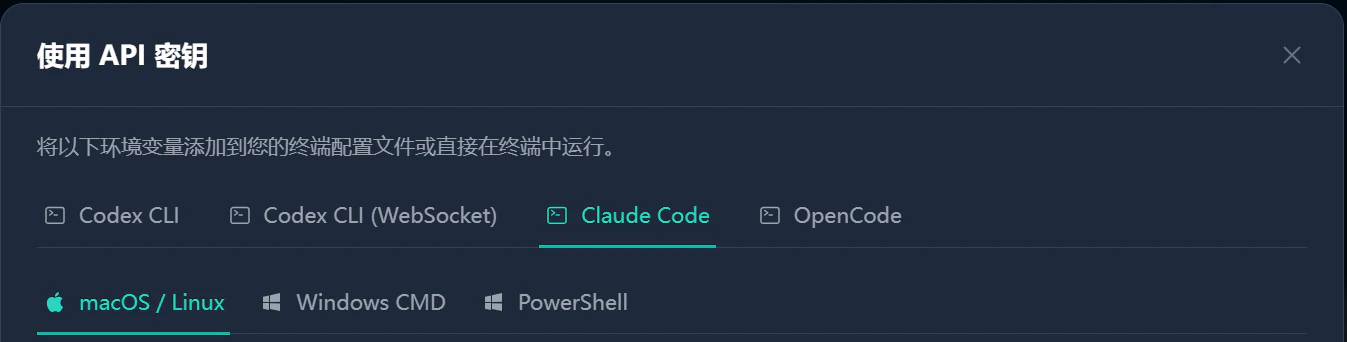
Copy config The dashboard command includes the current API Key. The examples below use YOUR_4096BYTES_API_KEY as a placeholder.

Temporary environment variables

Use this method for a quick test. The variables disappear when you close the terminal.

macOS or Linux

export ANTHROPIC_BASE_URL="https://api.4096bytes.com"
export ANTHROPIC_AUTH_TOKEN="YOUR_4096BYTES_API_KEY"
export CLAUDE_CODE_DISABLE_NONESSENTIAL_TRAFFIC=1
claude
If your Claude Code version requires ANTHROPIC_API_KEY, use this instead:
export ANTHROPIC_BASE_URL="https://api.4096bytes.com"
export ANTHROPIC_API_KEY="YOUR_4096BYTES_API_KEY"
export CLAUDE_CODE_DISABLE_NONESSENTIAL_TRAFFIC=1
claude
Do not set both ANTHROPIC_AUTH_TOKEN and ANTHROPIC_API_KEY. Prefer the variable name shown in the dashboard.

Windows PowerShell

$env:ANTHROPIC_BASE_URL = "https://api.4096bytes.com"
$env:ANTHROPIC_AUTH_TOKEN = "YOUR_4096BYTES_API_KEY"
$env:CLAUDE_CODE_DISABLE_NONESSENTIAL_TRAFFIC = "1"
claude
If the dashboard uses ANTHROPIC_API_KEY, replace the second line with:
$env:ANTHROPIC_API_KEY = "YOUR_4096BYTES_API_KEY"

Windows CMD

set ANTHROPIC_BASE_URL=https://api.4096bytes.com
set ANTHROPIC_AUTH_TOKEN=YOUR_4096BYTES_API_KEY
set CLAUDE_CODE_DISABLE_NONESSENTIAL_TRAFFIC=1
claude
If the dashboard uses ANTHROPIC_API_KEY, replace the second line with:
set ANTHROPIC_API_KEY=YOUR_4096BYTES_API_KEY

Persist in Claude Code settings

For long-term use, write the environment variables into the Claude Code settings file.
{
  "env": {
    "ANTHROPIC_BASE_URL": "https://api.4096bytes.com",
    "ANTHROPIC_AUTH_TOKEN": "YOUR_4096BYTES_API_KEY",
    "CLAUDE_CODE_DISABLE_NONESSENTIAL_TRAFFIC": "1",
    "CLAUDE_CODE_ATTRIBUTION_HEADER": "0"
  }
}
A common path is ~/.claude/settings.json. Save the file and restart Claude Code.
Do not put API Keys in project .env files, README files, screenshots, or shared documents. Claude Code reads the current terminal environment, so also avoid exposing keys in logs and screenshots.

Persist in shell config

You can also write the variables into ~/.zshrc or ~/.bashrc.
export ANTHROPIC_BASE_URL="https://api.4096bytes.com"
export ANTHROPIC_AUTH_TOKEN="YOUR_4096BYTES_API_KEY"
export CLAUDE_CODE_DISABLE_NONESSENTIAL_TRAFFIC=1
Then reload the shell:
source ~/.zshrc
For Bash:
source ~/.bashrc
Run:
claude

Specify a model

If Claude Code needs an explicit model, use the model name shown for Claude Code or Claude compatible access in the dashboard.
claude --model PASTE_MODEL_NAME_FROM_DASHBOARD
The model name must match the dashboard exactly.

Notes

  • Use the root Base URL shown in the dashboard, for example https://api.4096bytes.com. Do not append /v1/messages.
  • After switching Providers, reopen the terminal or confirm the environment variables are updated.
  • If you use CC Switch, confirm the active profile is 4096bytes.
  • If you run Claude Code inside VS Code Terminal, reopen VS Code after changing environment variables.

Troubleshooting

IssueWhat to do
Authentication failedConfirm the API Key is complete and only one of ANTHROPIC_AUTH_TOKEN or ANTHROPIC_API_KEY is enabled.
Wrong addressUse the root address shown in the dashboard. Do not append the full request path.
Still using official serviceReopen the terminal and check whether old Claude environment variables still exist.
Model unavailableUse a Claude Code or Claude compatible model name shown in the dashboard.
Not working in VS CodeClose and reopen VS Code so the terminal reads the updated environment.