

Open the API keys page
1
Sign in to the dashboard
Visit https://dash.4096bytes.com/login and sign in to your 4096bytes account.
2
Open API keys
In the left menu, open API Keys.
3
Review existing keys
The page lists keys created under the current account. You can refresh the list or create a new key.

claude-code-mac, codex-work, or cursor-desktop.
Create a key
Click Create key. The dashboard opens a dialog. At minimum, fill in Name and choose a Group. Keep other switches off unless you know you need the restriction.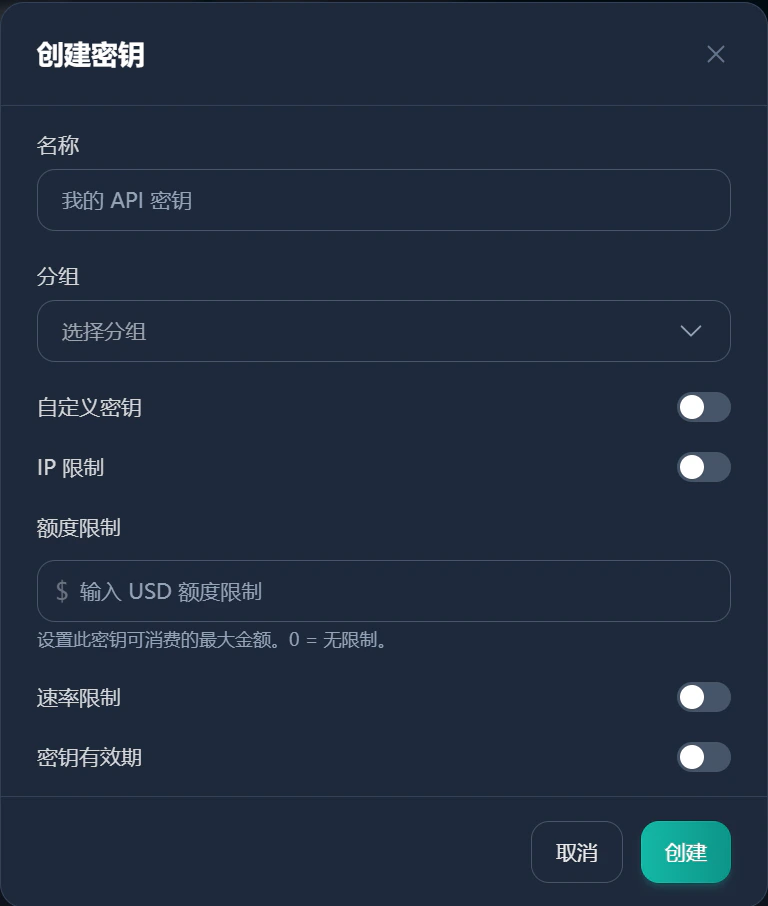
1
Enter a name
Use a clear name such as
macbook-codex, cursor-work, or cherry-studio-home.2
Choose a group
Select the model route, plan, or group this key should use. Rates, available models, and quota rules may differ by group. Use what the dashboard shows.
3
Leave custom key off
Keep Custom key disabled unless you have a specific reason to fix the key string. Auto-generated keys are safer.
4
Enable IP restriction only when needed
Use IP restriction only for fixed servers or fixed outbound IPs. It is usually not suitable for laptops or mobile networks.
5
Set a quota limit if needed
Quota limit controls the maximum USD amount this key can consume.
0 means unlimited. Use a small limit for temporary projects, team members, or rarely used devices.6
Set rate limits if needed
Enable Rate limit only when you need to reduce concurrency or prevent abnormal client usage.
7
Set an expiry if needed
Use Key validity period for temporary test keys. Long-term local tools can stay valid longer.
8
Create and copy
Click Create. Copy the API Key immediately and store it somewhere safe.
Naming examples
Store and use the key
Store the key in a password manager, system keychain, or local-only environment variable. Do not put it in public repositories, screenshots, chat logs, or shared documents. For Claude Code, check whether the API key list has a Use key action. The dashboard may show environment variables or config snippets for that key. For tools that support import, check whether the dashboard provides a one-click import action. Names and available actions depend on the current dashboard.Test whether the key works
After creating a key, prefer the target client’s built-in test action. You can also test the OpenAI compatible models endpoint.macOS or Linux
Windows PowerShell
YOUR_4096BYTES_API_KEY with the API Key you just created.
If the response contains a model list, the API Key and Base URL are basically working.
If the test fails, check these items first.